Create the sock shape and let DesignaKnit help you position stitch patterns on your Christmas stockings (or any socks).
In This Lesson
Create a stocking (sock) shape
The steps to create your own sock pattern
Tutorials
Download a sample shape file
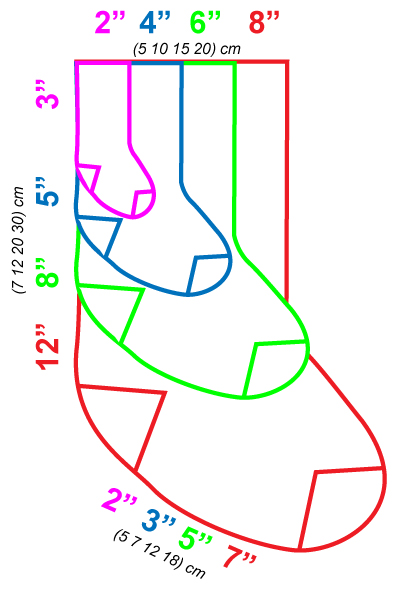
Suggested stocking sizes
Stitch pattern inspiration
Christmas Stocking
Create a Stocking (sock) Shape
Christmas Stocking
The Steps to Create your Own Sock Pattern
Steps:
Notes:
1. Start with the sock dimensions: Circumference, Leg Length, Foot length
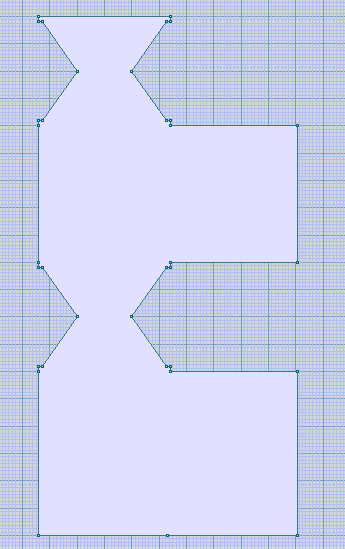
2. Create 3 rectangle pieces in Original Pattern Drafting:
Piece 1: Circumference x leg length
Piece 2: 1/2 circumference x 3-4"
Piece 3: Circumference x foot length
Menu: >Piece >New Piece
3. Use the DAK feature "Construct Slope" to shape the first half of the heel. (Use Exact Stitch Layout to make sure the shaping is worked 1 stitch every other row)
Menu: >Edit >Construct Slope (DAK 9)
4. Remove any extra rows so the piece is shaped correctly
Click points with the Minus Tool
5. Copy the heel piece
Menu: >Piece >Duplicate Piece
6. Rotate the duplicate heel piece 180 degrees
7. Use the "join" feature to join the short sides of the 2 heel pieces
Menu: >Piece >Join
8. Duplicate the heel pieces
Menu: >Piece >Duplicate Piece
9. Use the "Join" feature to join all 4 pieces
Menu: >Piece >Join
10. Check the shaping method of the heel shaping
Menu: >Technique >Shaping Method
11. Save the file
Menu: >File >Save As
12. Integrate this piece in Stitch Designer to add your stitch patterns