The Goal
DAK 9 Background Trace Feature
Explore yet another way of creating shape files in DesignaKnit Original Pattern Drafting. In addition to learning about the Trace tool, we will focus on precisely manipulating points with the Table Feature.
Even if Background Trace isn't in your future, using the table feature is a skill you need for success with Original Pattern drafting
Explore yet another way of creating shape files in DesignaKnit Original Pattern Drafting. In addition to learning about the Trace tool, we will focus on precisely manipulating points with the Table Feature.
Even if Background Trace isn't in your future, using the table feature is a skill you need for success with Original Pattern drafting
- Create a scan, take a photo of a diagram, or use a diagram from a sewing pattern or drafting software like Fittingly Sew Help
- Determine the max dimensions from the knitting pattern or measure the sewing pattern.
- Establish the measurement of the widest point and the longest point
- Create a simple piece in the Original Pattern Drafting workspace to get started
- Place the drawing into the DesignaKnit workspace BEHIND that piece
- Add points to the piece using the background as a reference
- Create the shape by manually moving the points and accurately positioning them using the table feature
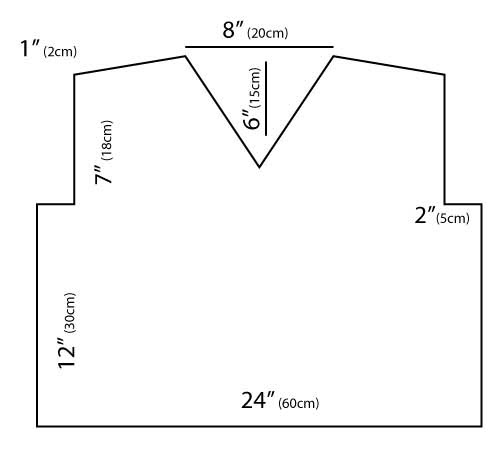
- Practice: Trace a basic Sweater Front
- Exercise: Challenge yourself in DesignaKnit on your computer
- The solution